Skip to content

Anastasiia Bondarchuk

Easy Lens WebLens Components

Easy Lens Web · Chapter · V2

Lens Components

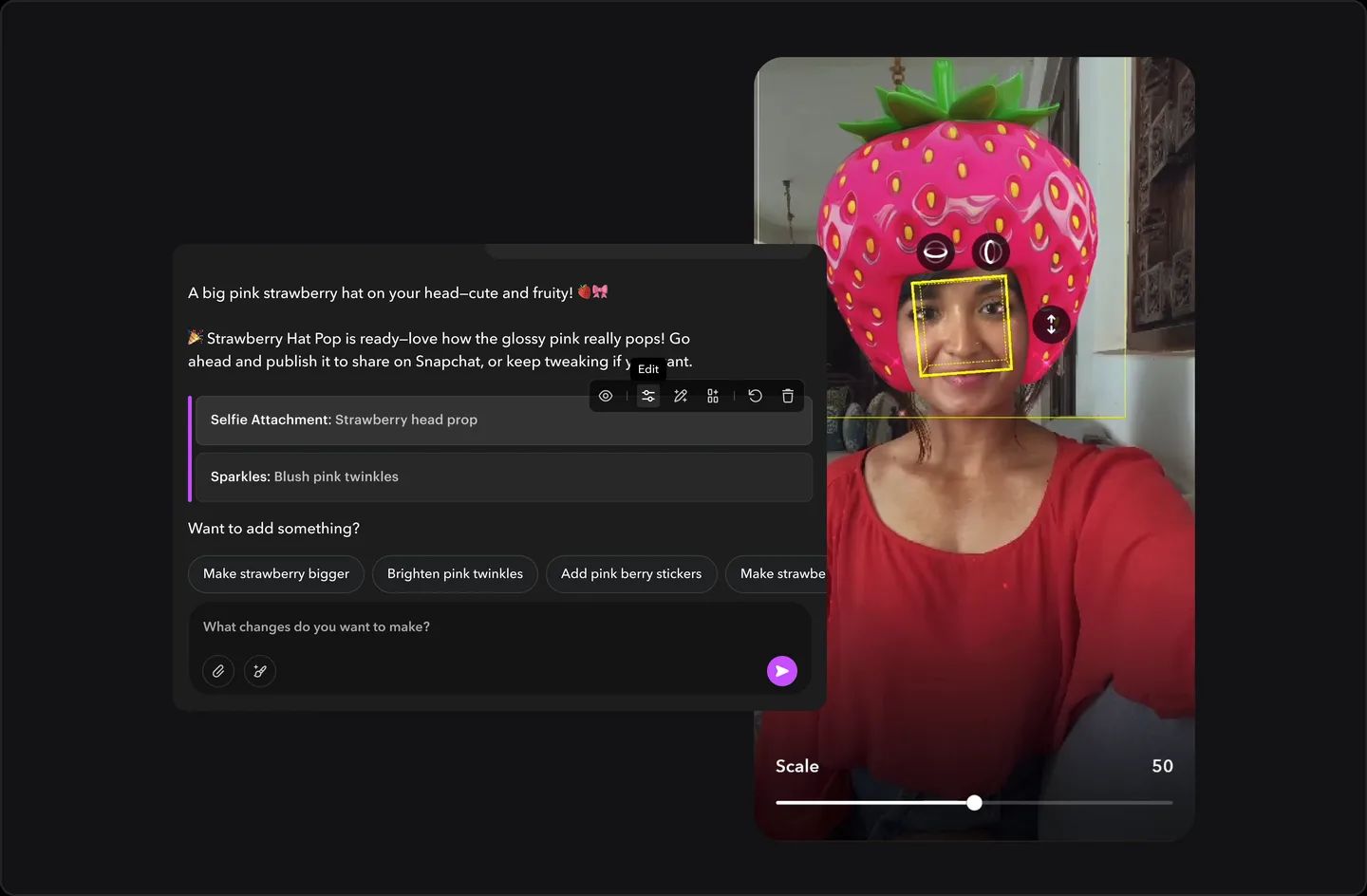
A component row in edit mode while its controls sit on the Lens preview, with a Scale slider.

The AI builds a Lens as a stack of components. I designed the layer that keeps each one editable, so a generated Lens is only a starting point.

Role
Sole designer of how creators edit what the AI builds: the component actions, how components look in the chat, and the editing flow from start to finish.
Team
Product, engineering, ML, UX research and my design lead
Timeline
V2 · Oct 2025
Outcome
Every generated Lens opens as editable components

Problem

If creators can't change what the AI made, they aren't in control.

Chat-based creation can turn into a black box. You type a prompt and take what you get.

Components were already part of V1. Creators built a Lens from them by hand, starting in the component editor. In V2, the AI takes that first step. Some components carried over from V1 and some were new. The editing controls carried over too. What changed is when it comes in. In V1 it was where creation started. In V2 it's how creators take over what the AI built.

My part and the team's

My part was how creators edit what the AI builds.

Engineering and ML defined how the AI builds a Lens from components, and the generation models were ML's. We worked out as a team how components would show up for creators, with product, engineering, ML, UX research and my design lead.

I designed the component actions, how components look in the chat (including the "Edited" label), and the editing flow from opening a component to finishing the edit. That includes Change Asset and creating a new asset.

What I designed

Every component has its own controls.

Component actions

Each component sits in the chat as a labeled row, such as Head Gen, Scene Gen, Sticker or Text. Hover a row and its actions appear: show or hide, adjust, edit with AI, change the asset, undo and delete.

Recreated interaction, sample data.

Adjust is manual and happens on the preview. Edit with AI re-prompts just that component. Undo works per component. Changed components carry an "Edited" label, so it's clear what the AI made and what the creator changed.

Recreated interaction, sample data.

Change Asset

The first asset isn't always the right one. Change Asset opens the Add Asset library, filtered to that component's type. It holds every asset the creator has generated, searchable and sorted by date. New generations land there on their own. Pick one and it swaps into the component, live in the preview.

Recreated interaction, sample data.

Create a new asset

When nothing fits, Create new starts a generation from inside the component. It shows the Easy Lens library first. If nothing there fits either, the creator picks Face Gen or Scene Gen and describes the asset in plain words. A preview comes first, then the final result. When it's ready, the creator adds it to the Lens.

Recreated interaction, sample data.

Who does what

The AI makes the first version. The creator decides what stays.

MomentThe AI doesThe creator does
First buildBuilds the Lens as a stack of componentsSees each one as a labeled row in the chat
AssetsPicks an asset from the Easy Lens libraryChanges it with Change Asset, one click away
Small changesRe-prompts just that component (Edit with AI)Adjusts it by hand on the preview, and can undo each component on its own. Changed components get an "Edited" label
New assetsGenerates a preview, then the final resultDecides whether to add it. Nothing lands until they've seen it

Decisions and tradeoffs

Start with an asset, not a question

Options
The AI asks the creator to pick an asset first, or picks one from the Easy Lens library and lets the creator change it. I explored both.
We chose
The AI picks.
Why
It asks less of the creator. Changing something is easier than coming up with it from nothing.
The cost
The AI sometimes picks the wrong asset.
How I handled it
Change Asset sits on every component, one click away.

Blocking the chat, and designing the wait

We chose
Block the chat while a new asset generates.
Why
It was technically hard to tell when an asset had finished. If creators kept editing, the result could land in the wrong state.
The cost
The creator's time.
How I handled it
I designed the wait. Creators see an estimate of how long it takes up front, and get a notification when it's ready. Adding the asset stays their call, so nothing lands in the Lens until they've seen it. My Chat Threads concept explored how to remove the block.

Outcome

Creators can adjust, swap or regenerate any part without starting over.

Shipped. Every Lens the AI generates on Easy Lens web opens as editable components.

Next chapter