
Skip to content

Anastasiia Bondarchuk

Generative Plugins

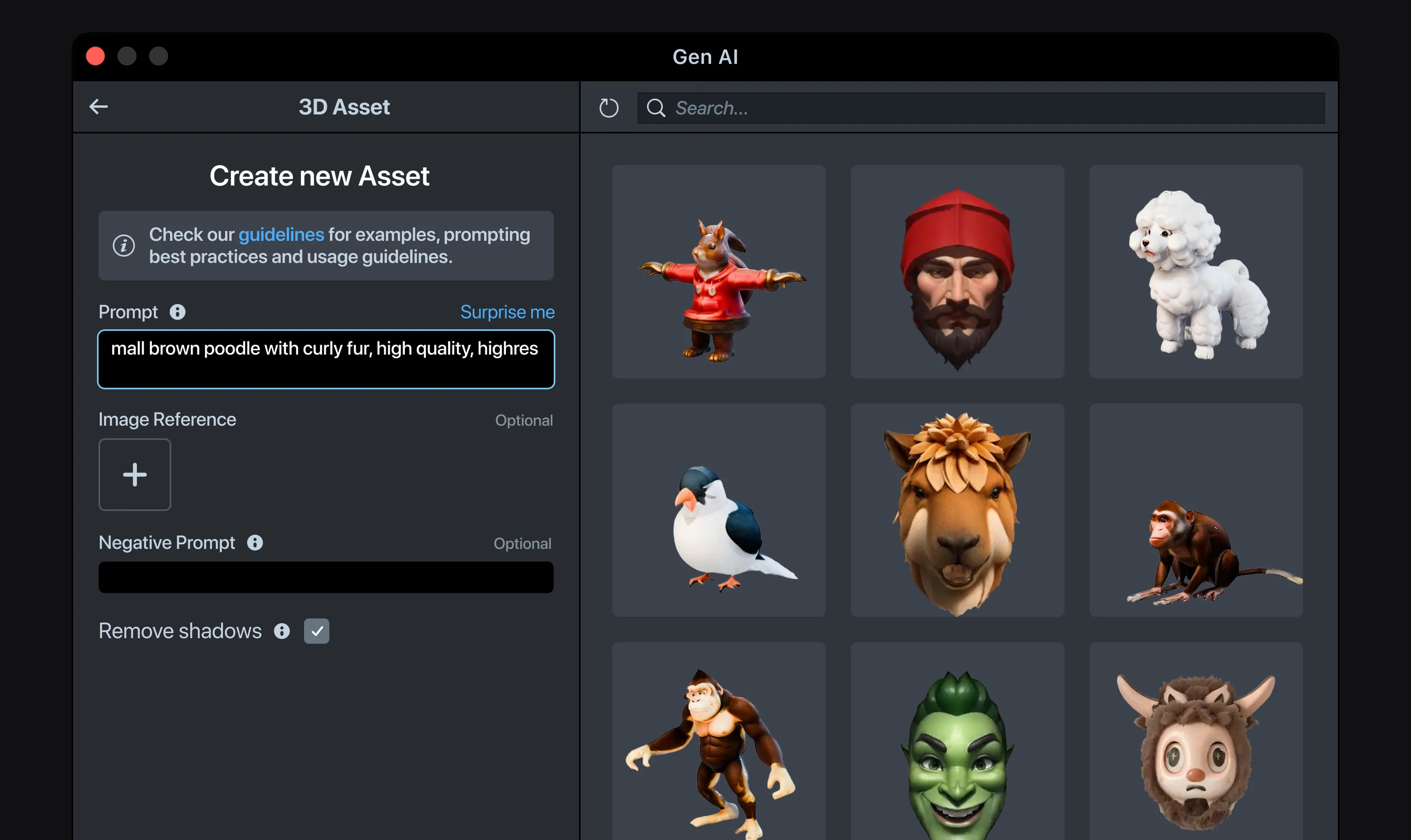
The 3D Asset plugin in Lens Studio: a prompt on the left, a gallery of generated 3D assets on the right.

Generative Plugins

2024
ShippedPro-tool AIshared design template
Role
Sole designer of the desktop plugin UX and the shared template: ML Face Effects and Immersive ML first, then four generative tools. The ML team built the models.
Team
Our team, ML included, integrated the plugins into Lens Studio · Lens Studio itself was another team's
Timeline
2024
Outcome
All six tools shipped in Lens Studio Desktop

A Lens is an effect you play with in the Snapchat camera, like dog ears or a new background.

Expert creators build Lenses in Lens Studio Desktop, a professional IDE. I designed six ML and generative tools inside it, most of them on one shared design template. Easy Lens on desktop wasn't mine.

Problem

Expert creators had no way to generate assets inside their own tool.

Lens Studio Desktop is a full creation IDE, with a scene hierarchy, inspector and timeline. Expert creators live there. But icons, 3D models and face effects meant leaving for external pipelines, or waiting on someone who could build them.

Where it started

ML Face Effects and Immersive ML began on the web, then moved to desktop.

Both started on the web, in the Easy Lens internal ML tool and beta. But expert creators build their Lenses in Lens Studio Desktop. So both tools moved there as plugins, and creators could use them without switching between tools.

ML Face Effects and Immersive ML work in the same four steps. The screens show ML Face Effects.

1 · Prompt

The creator describes the effect in a text prompt, or uses an image as the reference.

2 · Preset

They can start from a preset. Presets set how strong the effect is, how much the person still looks like themselves — overall and feature by feature — and whether their skin tone stays the same.

3 · Preview

The AI generates a preview first, on sample faces, so the creator sees the effect before committing to training, the slow step. To adjust it, they copy the settings into a new version, tweak them, and preview again.

4 · Training

When the preview looks right, the creator sends it to training. Training is the slow step, which is why the preview comes first. Shown at the end: an effect trained earlier, ready to import.

What held it back

They were designed one at a time, so each new tool would have been another flow to learn.

The shared template

Most of the next tools shared one template.

Then four generative tools were on the way. I took what ML Face Effects and Immersive ML had in common and turned it into a template. Every tool on it works the same way. The creator writes a prompt, adds a reference if they want, gets previews, picks one and applies it to the Lens. 3D Asset Generation, Head Morph and Body Morph all run on it, so creators learn the flow once.

3D Asset Generation

1 · Describe

The creator describes the asset they want in a prompt.

2 · Generate

The AI generates four 3D previews to compare.

3 · Refine and choose

Not quite right? The creator refines the prompt and regenerates, then picks the preview they want.

4 · Import

The finished model opens in a 3D viewer. The creator sets the polycount and texture size, then imports it into the Lens project. Shown here with an asset generated earlier.
Head Morph and Body Morph

Creators reshape an asset from a text or image reference. They change its geometry and texture, tune the intensity and preview it live before importing. Both tools follow the same template, with one preview instead of four.

Icon Generation

The Lens icon has its own design, right where it's set.

The Lens icon is one of the first things people see, so it got its own design outside the shared template. Creators generate it right in Project Settings: a prompt and a style give four options to pick from, then auto-crop and background controls finish it. A generated icon is a starting point they can keep refining, or they can import their own instead.

Decisions and tradeoffs

One template, not a flow per tool

Options
Design each new tool from scratch, or turn what the first two had in common into a shared template.
I chose
The shared template.
Why
Building each tool from scratch would have meant more flows for creators to learn. A shared template made the suite feel like one tool instead of several.
The cost
Some tools could have worked better with their own design. To keep them alike, I stuck to the shared template.
How I handled it
I improved the template as a whole. When one tool needed an improvement, I brought it to every tool, so the template stayed one system.

One panel was the plan, but the platform said otherwise

The plan
A single Gen AI panel with every tool inside it.
The platform decided
These tools were plugins, and each plugin is its own custom component in Lens Studio Desktop. So each tool had to open separately, from its own place in the Lens Studio UI.
The cost
Separate panels instead of one.
How I handled it
The shared template made the separate panels feel like one suite.

A new workflow inside someone else's tool

Why
There were no existing conventions for plugin panels like these.
I chose
Follow the Lens Studio design system wherever it applied, and design new patterns where the workflow was new.
The cost
Some elements could have been better. We were building all the tools at once, so we put development speed ahead of new components.
How I handled it
We improved things step by step, and added new components to the system later, once they'd proved themselves.

Outcome

Experts generate assets without leaving the tool they already use.

FeatureBeforeAfter
Asset generationLeave for external pipelines, or wait on someone who could build themGenerate inside Lens Studio Desktop
Face effects (as of spring 2024, at launch)Internal ML engineers spent a couple of days creating and refining each effect, then shared it with creators as a templateCreators make their own effects
3D assets (as of spring 2024, at launch)A 3D engineer spent an estimated 16–20 hours building one asset for a Lens by handFirst internal designers and later any Lens creator, in about 15 minutes of creating and iterating on average

Together with Easy Lens on the web, the plugins cover both ends: no-code creation for anyone, and AI generation for experts.

Other case studies

Easy Lens Mobile Redesign

Creation on mobile was a bar people didn't notice. I gave it its own place, then designed how creators edit there.

Shipped after I leftResearch → shipped iteration